Wednesday, April 29, 2015

Spring Art Show

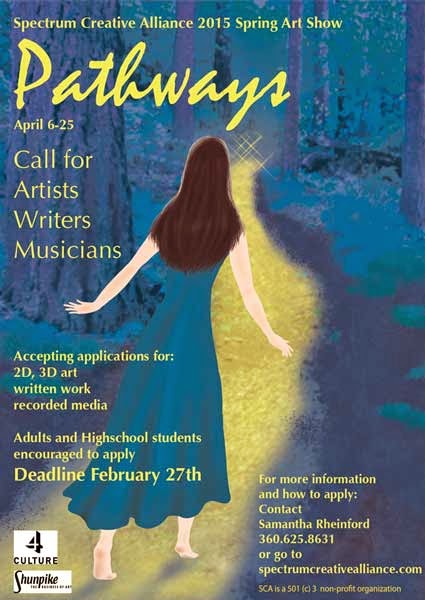
A local arts organization that I'm currently involved with needed a flyer for their month long art show. It was called "Pathways". This flyer I wanted to have a more organic feel and give the impression of fine art. In my photo library, there was an image of a forest with a path going through it. I wanted the path to go from left to right so the image was flipped in photoshop. I wanted rich color in cool tones and the path to stand out. Hue and saturation were used to bump up the color and a color overlay which resulted in an over all purple. The path was painted in yellow and a mask was used to bring it out. The woman was hand drawn in photoshop.

This was actually the second flyer I did for the group. The first was a call for artists and was in blue. I used a color overlay to change the color to purple.

This is the background image I used.
Call for Artists and the art exhibit flyers


And here it is without the text and logos. I think it stands on it's own as digital art.

Wednesday, April 1, 2015

Once Upon a Logo

I finally have a logo of which I am pleased. It only took about 4 years and several iterations.
My business was started during the last year of college and one of the class assignments included creating a logo and website. I wanted to play off the name Left of Center Graphics and came up with this. Gold and yellow gold were used because they are often associated with money and coins.

My instructor said it looked like an olive.


Yep, it does.


I tried this.


Bleh.


Then I played around some more in Illustrator. The goal was the same, playing off the name Left of Center Graphics, using green and gold for money, but adding the beech leaf for prosperity. 


Two different versions were created and I decided, although these were more interesting, both were too busy.  


Then I tried this.


Too gimmicky. Maybe I’m over thinking this.


I thought “keep it simple stupid” and tried this.

The design started in black and white and then I tried color. The gold was too yellow and was hard to see when in print.

Simple…but…boring. I liked the simplicity but it needed more interest.


While designing a client’s logo and playing around with a metallic look for them, I thought why not make the gold color look more like metal, give it shine? Now the logo looks like it's being transformed. The result is this design. 

The feedback has been that it looks professional and something a corporation could get behind.


A grayscale version was done and I’m mulling over whether I should add more contrast or leave it. The soft grays are nice. To see more of my work visit my website:

Thursday, July 31, 2014

Event Posters

I was asked to create a poster for the annual golf tournament. They wanted their logo at the top with their organization's name. The prominent sponsors needed to be highly visible. And they wanted a map showing cross streets for newcomers to the area. I figured a golf ball would catch the eye of golfers and used that image to highlight the two sponsors. I wanted to give a sense of distance and thought of photographs where the focus is in the foreground. To get a similar effect, I used Effect/Blur/Gaussian Blur for the background layers.

It gets to be a challenge when there is a lot of information included on the poster and a lot of sponsors. You have to decide on the priority of the information but the client should be providing input on priority. The mistake would be to try to make everything of equal importance then there is no focus. The poster ends up looking cluttered or confusing. I've seen posters that looked like all the information was yelling at you, competing for attention. Then I've seen posters where sponsor logos took up half of the space. Logos don't have to be huge; just big enough to be visible and recognizable.

Event posters need the following information:
  • The organization responsible for the event
  • The name of the event
  • Date, time and hours
  • Location
  • Contact information - this can include a website, address, phone number, Facebook page or other social media pages
  • Sponsors - usually listed at the bottom of the poster
  • Other information pertinent to the event such as registration fees, ticket prices, early bird specials, a map, a brief description of the event, this information depends on the event and what information the client wants on the poster
  • Sometimes a QR code is added

This poster was created in Illustrator. 

Tuesday, July 29, 2014

Spring Wine Walk Poster Draft vs Final

The Enumclaw Chamber of Commerce asked me to do their annual Spring Wine Walk event poster. The two images I'm sharing are more examples of the differences between a draft or comp version of a design and the final design. The designer gives enough to show the major elements, an idea of typography, where the information will sit on the poster, and the colors that will be used.
The first image is the draft. The wine glass is the prominent image with the tulip being the secondary image. I was going for an elegant look, using colors generally associated with spring, and using a flower (tulip) that blooms in the spring. Making the wine in the glass a dark red provides contrast against the cool pastel color used in the background and the white table cloth. Room was left to include the participating businesses.
Everything was created in Illustrator and in CS6 there are gradient pastels available. I played around with some of them and chose a blue pastel gradient that helped highlight the text.


This is the final version. The Enumclaw Chamber of Commerce wanted their logo at the top near their name. The participating businesses have been added, logos of sponsoring businesses including mine have been added, and some changes to the text were made. More detail was added to the wine glass, the perspective of the table was improved, and the colors of the tulip are more in the pink and yellow tones rather than orange, red and yellow. The tulip is lying on the table rather than looking droopy and like it's about to drop off the table.
I scrubbed the text looking for typos and inconsistencies. The word "wines" was capitalized in one sentence and was corrected.
Those who know about tulips may recognize the tulip in the poster as being based on parrot tulips that have frilled petals.

Tuesday, February 25, 2014

Draft versus Final


A poster was just completed for the Enumclaw Chamber Pub Crawl. Creating the poster included a draft sent to the board for their approval. I always do a draft in low resolution before proceeding with a final version. Changes are the norm when creating design and working with clients.

The first image is the draft or comp. Not all of the information was available for the draft but plenty of room was left for additional text, participating businesses, and logos of sponsors.

The second image is the final version.

To see more of my work check out my website: http://leftofcentergraphics.com/